Restriction compliance is complex, high-stakes, and constantly changing
Regulations vary by country, product category, and HS code. What's freely shippable today may be restricted tomorrow. Getting it wrong means returns, seized shipments, compliance penalties, and lost customer trust.
Regulations that defy manual review
Import and export regulations differ by country and product type. Manual review of government trade databases doesn't scale—and outdated data is just as bad as no data at all.
The cost of getting it wrong
A single restricted item reaching the border creates delays, fines, and return shipment costs—far exceeding the cost of checking before it ships.
Zonos Restrict Zonos AI evaluates items against an expansive, continuously updated dataset of import and export restrictions from around the world. Submit an item with its name, HS code, description, and origin/destination countries—and get back a clear restriction result with an AI confidence score in milliseconds.
Plain-language restriction categories
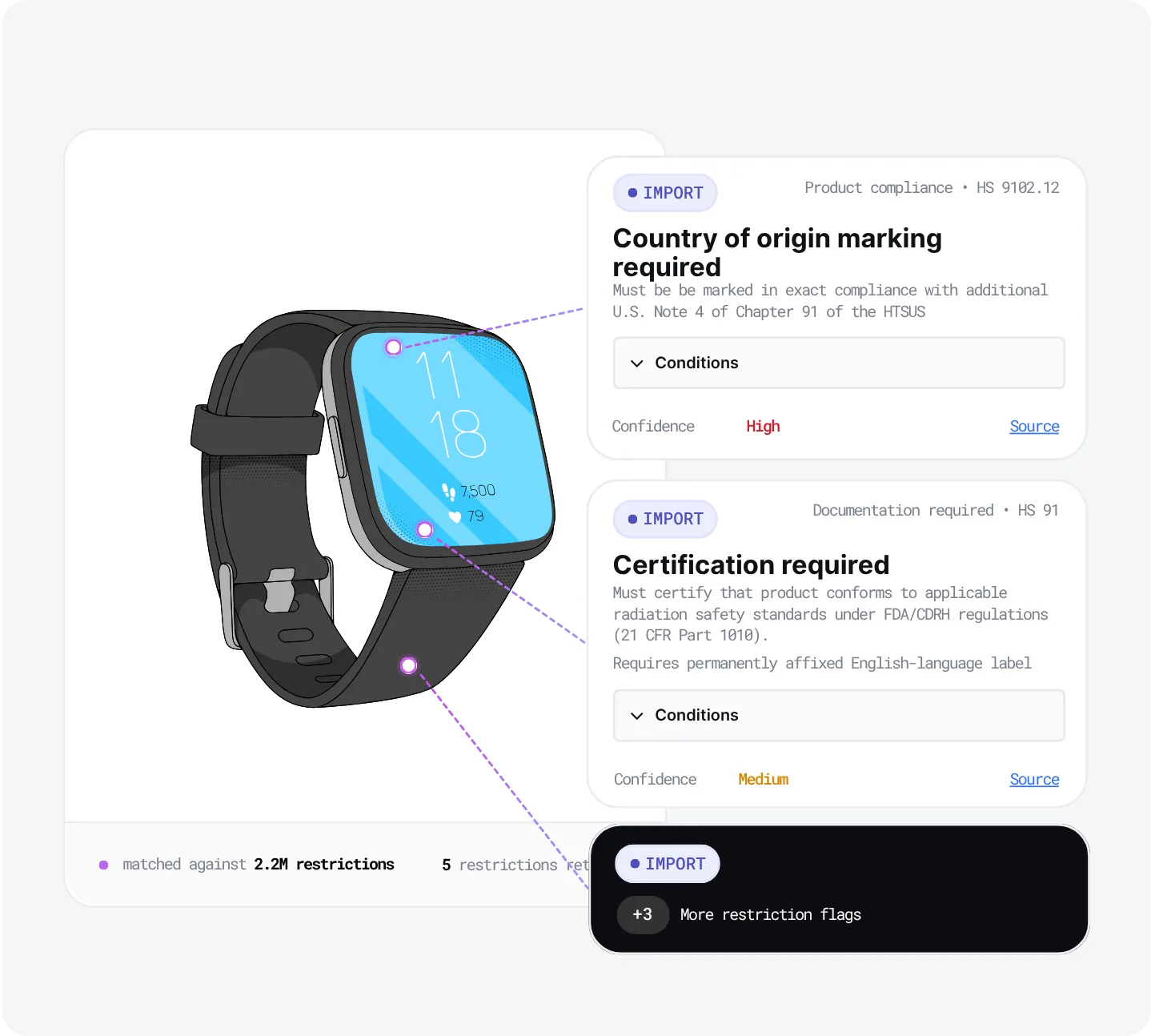
Every applicable restriction comes back tagged with one of five categories—dangerous goods, documentation, permits, cost-related measures, or restricted measures—so your team and your systems instantly understand the nature of the rule without parsing raw regulatory text.
How Zonos Restrict Zonos AI works
01 — Submit item details
Submit the item's name, description, HS code, ship-from country, and ship-to country. Optional inputs like materials, category, and brand narrow the results further.
02 — Match against the dataset
Restrict matches the item against a comprehensive dataset of government import and export regulations, filtered by HS code and destination.
03 — AI refinement
Semantic search and the Zonos AI restriction model refine the initial matches, filtering out restrictions that don't apply to the specific item—dramatically reducing false positives.
04 — Receive scored results
Each applicable restriction is returned with its category, a human-readable summary, and a confidence score—ready for your system to act on.
One call returns both import and export restrictions.
AI-enhanced results that cut through the noise
Legacy restriction tools rely on a single signal—the HS code—and return broad, unrefined lists with a high rate of false positives. Restrict Zonos AI layers semantic search, a purpose-trained AI model, and real-world feedback on top of the regulatory dataset, delivering matches that are roughly 80x more accurate than HS-code-only matching, with confidence scores your systems can act on.
Semantic search refinement
Embedding-based semantic search filters the initial match set down to restrictions that are genuinely relevant to the item's description, materials, and category—not just its HS code heading.
AI restriction model scoring
Our AI model—trained on global restriction data—assigns a confidence score to each remaining restriction, indicating how likely it is to apply to this specific item. High-confidence matches surface clearly; low-confidence noise is filtered out.
Self-improving over time
As Restrict processes more items, the pipeline learns from real-world results—continuously improving coverage and reducing false positives for the item types your business ships most.
Use alone or as part of Zonos Greenlight Zonos AI
Use Restrict on its own as a standalone item-restriction API — or as one of five AI-powered checks inside Greenlight, our all-in-one export readiness API.
Who uses Zonos Restrict Zonos AI
Merchants and marketplaces
Block restricted items from being listed or purchased for destinations where they cannot legally or practically ship—protecting revenue and avoiding costly returns.
Carriers and postal operators
Validate shipper-provided item data against restriction rules before accepting a shipment—reducing liability and downstream clearance failures.
Package forwarders
Screen items against import and export restrictions before packages enter or leave the postal network, catching prohibited goods before they create compliance incidents.
What is Zonos Restrict Zonos AI?
Zonos Restrict is an AI-powered item restriction API that determines whether a specific item can be shipped between two countries. It checks against import and export regulations from around the world, returning each applicable restriction with a plain-language category (like "Documentation required" or "Dangerous goods") and a confidence score.
What inputs does Restrict Zonos AI require?
Restrict requires the item's name, description, HS code, ship-from country, and ship-to country. Optional fields—including materials, category, and brand—help narrow results and improve accuracy. The more detail provided, the more precise the output.
How are results categorized?
Each applicable restriction comes back labeled with a category—such as "Documentation required" or "Dangerous goods"—that describes the nature of the rule. The label gives your team and your systems immediate context for what action to take, without having to parse raw regulatory text.
How accurate is Restrict Zonos AI?
The current Restrict pipeline is approximately 80x more accurate than legacy HS-code-only matching, achieved through a multi-step pipeline of dataset matching, semantic search refinement, and AI confidence scoring.
How does Restrict Zonos AI differ from Zonos Greenlight?
Restrict focuses on item-level compliance: whether a specific product can be shipped to a specific destination based on its HS code, description, and physical properties. Greenlight focuses on export compliance at the shipment level, running five checks—including denied party screening, restricted party lists, and embargoed country checks—in a single API call. The two products complement each other and can be used together for end-to-end compliance coverage.
How is Restrict Zonos AI integrated?
Restrict is available via the Zonos API and is built into Zonos Checkout. Merchants can also configure item restriction rules directly in the Zonos Dashboard—blocking checkout for restricted items by destination country without writing additional code.
Stop restricted items before they become a problem.
Zonos Restrict Zonos AI gives merchants, carriers, and forwarders the AI-powered compliance layer they need to ship with confidence—across every product, every destination, every time.
Know which items can ship before they reach the border.
Zonos Restrict Zonos AI tells you exactly which restrictions apply to any item shipping to any destination, instantly. Try it below for free, up to 3 uses.
Book a demo